Best AI APIs for Developers
Compare the best AI APIs for developers based on model quality, pricing, latency, multimodal support, documentation, and production fit.
Best AI APIs for Developers
AI APIs are now part of everyday product development, but the right choice depends heavily on what you are actually building. Some teams need text generation, others need embeddings, image generation, code assistance, or broader multimodal support. The best AI API is the one that fits your product workflow, latency expectations, pricing model, and integration complexity.
This guide compares practical AI APIs developers commonly evaluate when building assistants, copilots, search workflows, content tools, and AI-powered product features. For more providers, browse the FindAPI AI APIs category.
What developers should compare in an AI API
- model quality and task fit
- latency and response reliability
- pricing and token economics
- context window and output control
- multimodal support
- documentation quality and developer tooling
- rate limits and scaling constraints
- workflow fit for production use cases
The strongest AI API is not always the most popular one. In practice, the best option is the one that delivers the right output quality at the right cost and complexity for your specific use case.
Best AI APIs at a glance
1. OpenAI API
OpenAI remains one of the most common starting points for developers building text-generation, assistant, and AI productivity features. It is often chosen because the ecosystem is mature, the docs are strong, and the product fit is clear for many mainstream AI workflows.
Best for: text generation, assistants, content workflows, and general AI product features.
2. Google Gemini API
Google Gemini is especially relevant for teams comparing multimodal capabilities, longer-context workflows, and integration into products where broader Google ecosystem support matters. It deserves a place on the shortlist for developers evaluating text, image, and structured-output use cases.
Best for: multimodal workflows, long-context tasks, and structured-output-oriented applications.
3. Anthropic API
Anthropic is often compared when teams care about long-form reasoning, writing quality, and enterprise comfort around AI assistant behavior. It is frequently part of the shortlist for developer tools, internal copilots, and business-facing AI products.
Best for: long-form reasoning, writing-heavy workflows, and assistant-style applications.
4. Cohere API
Cohere is worth evaluating when the use case leans more toward retrieval, embeddings, reranking, and language infrastructure rather than only general chat-style outputs. It is often more relevant in search-heavy or enterprise information workflows.
Best for: embeddings, reranking, retrieval workflows, and enterprise text understanding.
5. Groq API
Groq is increasingly relevant when low latency matters. Teams building real-time or highly interactive AI applications often evaluate it because response speed can materially affect product experience even when output quality differences are smaller.
Best for: low-latency AI experiences and real-time interactive applications.
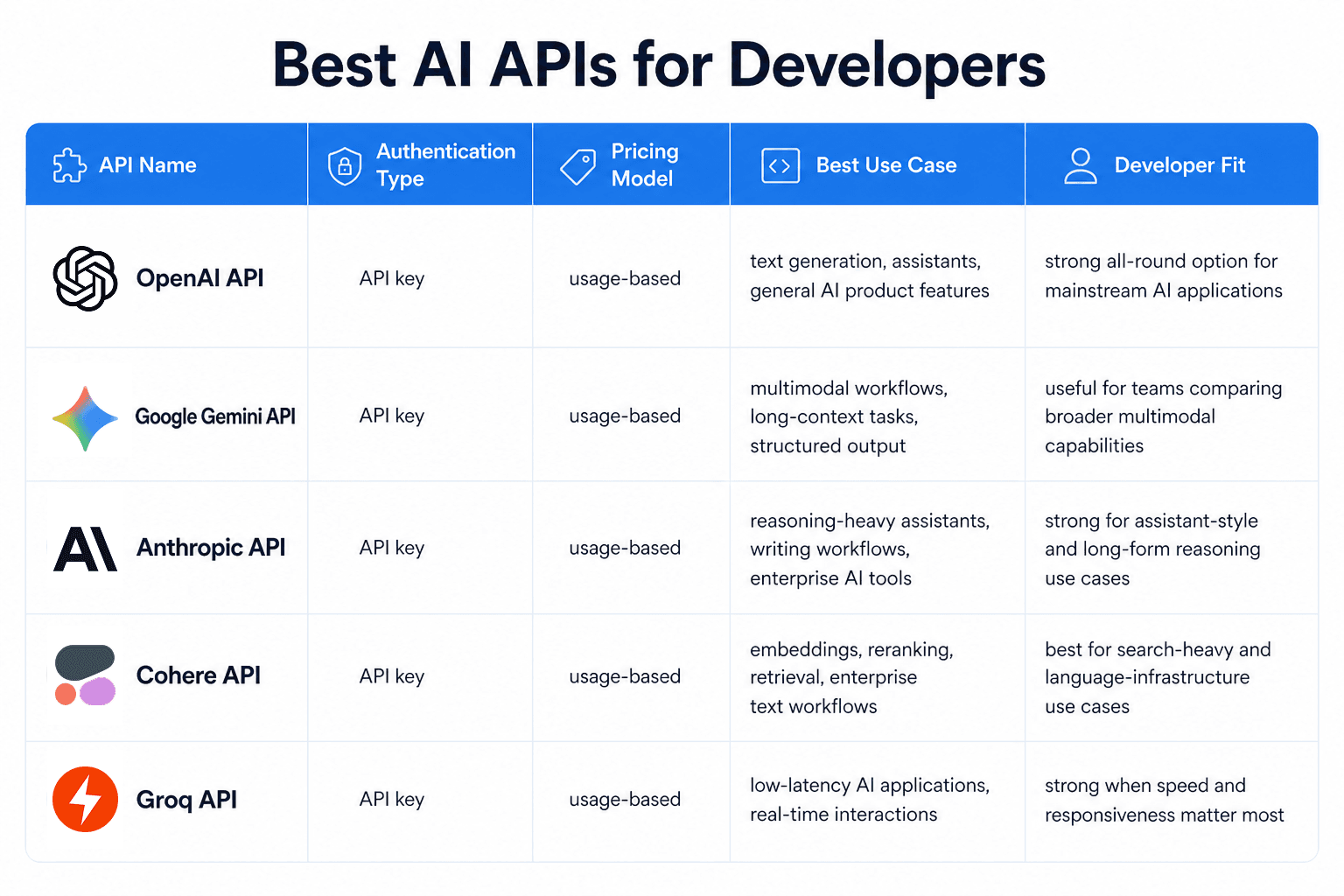
AI API comparison table
| API | Best for | Auth | Pricing model | Notes |
|---|---|---|---|---|
| OpenAI API | General AI product features | API key | Usage-based | Mature ecosystem and broad use-case fit |
| Google Gemini API | Multimodal and long-context tasks | API key | Usage-based | Strong multimodal and structured-output positioning |
| Anthropic API | Reasoning and writing-heavy workflows | API key | Usage-based | Often shortlisted for assistants and enterprise use |
| Cohere API | Retrieval and embeddings | API key | Usage-based | Useful for search and enterprise text workflows |
| Groq API | Low-latency AI applications | API key | Usage-based | Attractive when speed is the main differentiator |
Best AI APIs by use case
If you need a broad general-purpose starting point, OpenAI is a common first choice. If your product depends on multimodal input or longer contexts, Gemini deserves close evaluation. If you care more about reasoning-heavy assistant behavior, Anthropic is often relevant. If retrieval and reranking matter, Cohere can be a better fit. If latency is central to the user experience, Groq is worth comparing early.
Pricing, auth, and docs angle
Most AI APIs now look similar at the surface level because they use straightforward API-key auth and usage-based billing. The real differences show up in pricing at scale, model behavior, latency, tooling, rate limits, and how well each provider fits a production workflow. Developers should test at least two realistic options before locking in a provider.
How to choose the right AI API
- define the exact AI task before comparing providers
- shortlist two or three APIs that match the workflow
- compare quality, speed, and pricing together
- test with realistic prompts and product constraints
- choose the option with the best production fit, not just the strongest demo output
FAQ
What is the best AI API for developers?
That depends on the use case. OpenAI is a common all-round option, Gemini is strong for multimodal workflows, Anthropic often fits reasoning-heavy assistants, Cohere is relevant for retrieval-heavy applications, and Groq is worth comparing when latency matters most.
What should developers compare in an AI API?
Developers should compare model quality, latency, pricing, docs, scaling limits, workflow fit, and whether the provider supports the real input/output patterns the product needs.
Final take
The best AI API is the one that matches the product workflow, cost model, and user experience you actually need. Start with the job to be done, compare a focused shortlist, and validate the differences with real prompts before committing to one provider.
To compare more providers, browse the FindAPI AI APIs category.
Tags
About the Author
Tom
Helping developers evaluate APIs more efficiently by writing clear, practical guides on features, tradeoffs, and best-fit use cases.